

この記事はバージョン Spring ’26 において執筆しています。
現在の動作と異なる場合がありますので、ご認識おきください。
カスタマーサービスの領域は今、従来のルールベースのチャットボットから、自律的に思考して行動するAIエージェントの時代へと劇的な進化を遂げています。Salesforceが提供するAgentforceは、このパラダイムシフトを牽引する存在であり、顧客対応をより柔軟で適応力の高いものへと変革します 。
しかし、どれほどAIが賢くなっても、すべての問い合わせを自己完結できるわけではありません。複雑な契約変更、感情的になっている顧客への対応、VIP顧客からの特別な要望など、人間の「共感力」と「専門的な判断」が不可欠な場面は必ず存在します 。従来のボットシステムでは、AIが処理の限界に達した瞬間に単なる「緊急回避(フェイルオーバー)」としてオペレーターへ会話が投げ出されることが多く、結果として顧客に同じ説明を二度手間させ、フラストレーションを与えてしまう課題がありました 。
AgentforceとAgentforce Service (Service Cloud)のアーキテクチャが目指すのは、このような分断された体験ではありません。AIエージェントが単なる自動応答ツールではなく、優秀な「ゲートキーパー」として機能することが重要です 。ユーザーの意図を汲み取り、事前情報の収集や、会話履歴を要約したケースレコードの作成といった「事前準備」を完了させた上で、最適な人間のオペレーターにバトンを渡す「ダイナミックエスカレーション」こそが、これからのカスタマーサポートの鍵を握ります 。
エスカレーションを単なるエラー対応ではなく、コンテキストが維持された質の高い「戦略的な送客」へと昇華させることで、放棄呼を減らし、顧客満足度を大幅に向上させることが可能になります 。
本記事では、Salesforceの「拡張チャット v2(Enhanced Chat v2)」環境において、Agentforceエージェントから有人オペレーターへ会話をシームレスに転送する具体的な実装方法を解説します。
標準のエスカレーション機能に頼るのではなく、「カスタムサブエージェント」とオムニチャネルフローを組み合わせることで、自社のビジネスロジックに沿った理想的なハンドオフを構築する手順を画像を組み合わせながらステップ・バイ・ステップで見ていきましょう。
Step 0: 人間オペレーター転送のための事前準備
人間側が転送を受け入れるための事前準備をしておきます。
ルーティング設定
有人対応用のルーティング設定を作成します。
[設定] > [ルーティング設定] から Human というルーティングを、優先度 2 で作成します。

キュー設定
続いて、有人対応用のキューを作成します。
[設定] > [キュー] から、先ほど作成したルーティング Human を指定して新規キューを作成します。
オブジェクトに「メッセージングセッション」を選択し、ユーザーを含めておいてください。

Service Cloud ユーザー権限を付与
キューに含めたユーザーに対して、Service Cloud ユーザー の権限を付与します。
{設定} > [ユーザー] から、対象のユーザーを編集して、「Service Cloud ユーザー」にチェックを入れて保存します。

プレゼンス状況のアクセス有効化
キューに含めたユーザーに割り当たっているプロファイルまたは権限セットで、「サービスプレゼンス状況のアクセスを有効化」にオンラインのプレゼンスを含めます。

アプリケーションマネージャー設定
[設定] > [アプリケーションマネージャー] からコンソールのアプリ設定を開き、ユーティリティ項目に Omni-Channel を追加します。

Step 1: 感情分析プロンプトテンプレートの作成
[Agentforce スタジオ] > [プロンプトテンプレート] から「プロンプトビルダー」を開き、プロンプトテンプレートを作成します。
- [新規プロンプトテンプレート] ボタンを押す。
- プロンプトテンプレート種別に「Flex」を選び、情報を入力して [次へ]
- プロンプトテンプレート名: AnalyzeCustomerSentiment
- 説明: 顧客の発話を分析して数値スコアを返す。
- 入力値: utterance (
utterance) 自由テキスト
次に、プロンプトを書きましょう。
## 指示
以下の顧客の発話を分析し、最もネガティブな状態を0.0、フラットな状態を0.5、最もポジティブな状態を1.0として、数値(例: 0.15)のみを出力してください。分析の思考を正確に行う必要がありますが、テキストによる説明は一切含めないでください。
なお、顧客が伝えている発生事象のポジティブ/ネガティブではなく、感情のポジティブ/ネガティブを分析してください。

## 顧客の発話
{!$Input:utterance}
- 新規プロンプトテンプレート
- 情報を入力
- 動作確認

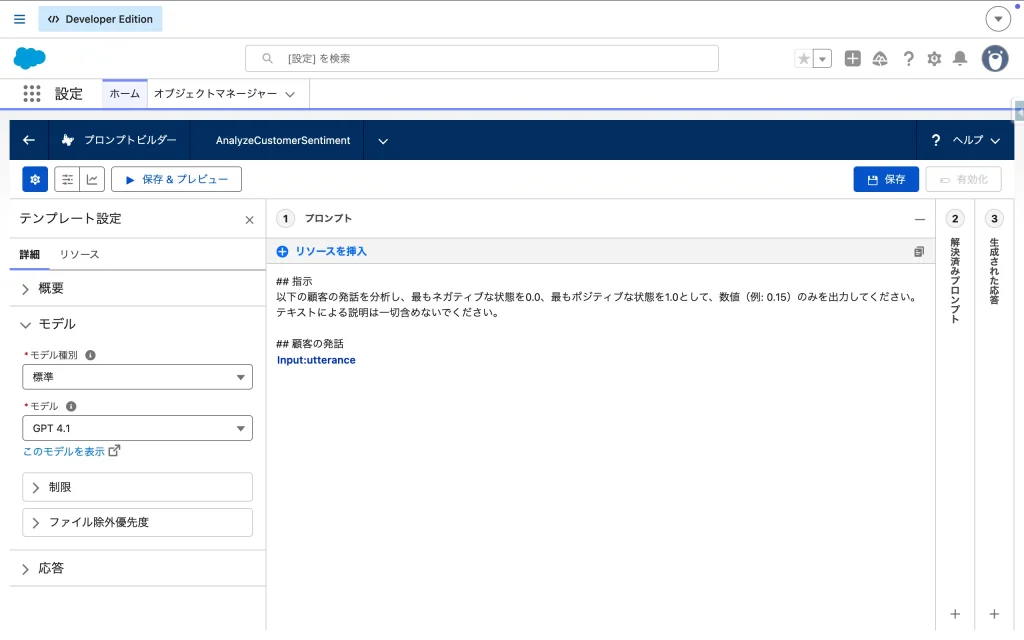
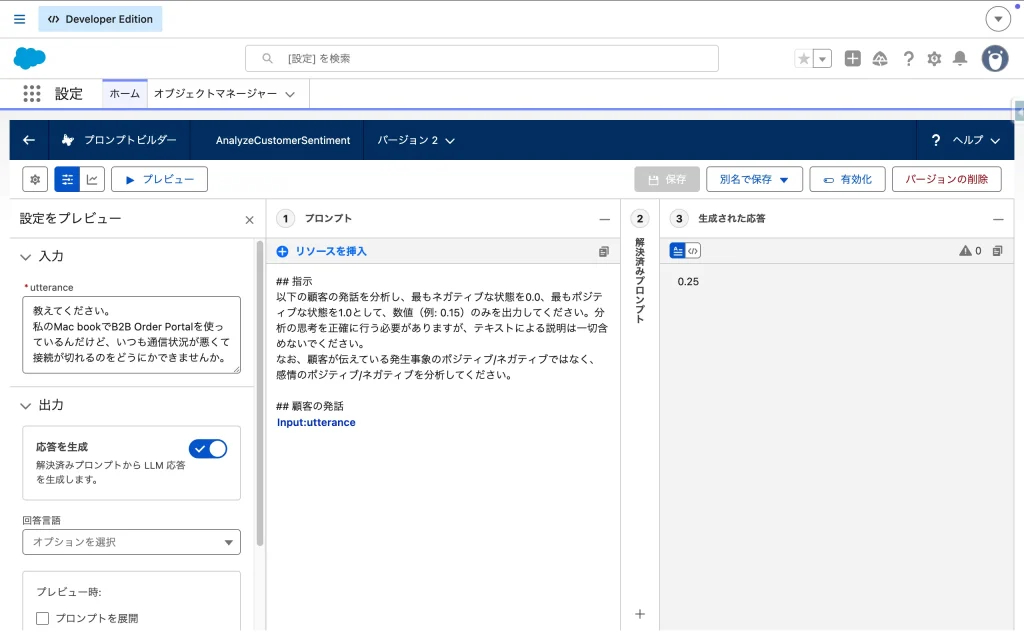
最後に有効化します。
Step 2: フローの作成
①自動起動フローの作成1
Agentforce から呼び出すフローは、画面を持たない 「自動起動フロー (Autolaunched Flow)」 である必要があります。
- 名前:
AnalyzeCustomerSentiment - 説明: 顧客の発話を受け取り、感情スコアを返す。
- 入力変数:
input_Text_Utterance(テキスト / 入力で使用可能) - 出力変数:
output_Number_SentimentScore(数値(1) / 出力で使用可能) - 数式変数:
fx_Numeric_QuantifiedSentimentScore(数値(1))
- 入力変数
- 出力変数
- 数式変数


VALUE({!AnalyzeCustomerSentiment.promptResponse})フローのロジック構築
- プロンプトテンプレート アクション:
- プロンプトテンプレート:
AnalyzeCustomerSentiment - 入力値:
utterance={!input_Text_Utterance}
- プロンプトテンプレート:
- 割り当て:
- プロンプトテンプレートAnalyzeCustomerSentimentから返却される感情スコアを出力変数に数値変換して割り当てます。
{!output_Number_SentimentScore{!fx_Numeric_QuantifiedSentimentScore
- アクション
- 割り当て


Q. どうしてAgentforceから直接プロンプトテンプレートを呼び出さずにフローを経由しているの?
A. Agentforceからプロンプトテンプレートを直接呼び出すのではなく、一度フロー(Autolaunched Flowなど)を経由させるアーキテクチャを採用する主な理由は、出力データの厳密な型変換と、プロンプトを実行する前に必要なデータの事前取得(前処理)を確実に行うためです。
- データ型の変換と成形(テキストから数値へのキャスト)
プロンプトテンプレートがLLMから受け取って出力する結果(Prompt Response)は、基本的に「テキスト(String)型」として返されます。 今回のセンチメント分析の例では、Agent Script内でif @variables.customer_sentiment_score < 0.3:という不等号を使った決定論的な数値比較を行っています。LLMが “0.15” と出力したとしても、それがテキスト型のままだとスクリプト側で正しく条件判定できないリスクがあります。そのため、フローを経由して数式等で明示的に「数値型(Number)」に変換し、Agent Scriptがそのまま安全に評価できる形に成形して返す必要があります。 - スクリプトのシンプル化と例外処理のカプセル化
フロー内でプロンプトテンプレートアクションを呼び出すと、処理が正常に完了したパスだけでなく、LLMの処理がタイムアウトした場合などのエラーハンドリングをフロー内で細かく定義することができます。データ取得やエラー処理といった複雑なロジックをフロー側に閉じ込める(カプセル化する)ことで、Agent Script自体は「フローを呼び出して結果を受け取り、分岐する」というルーティング制御に専念でき、スクリプトが肥大化してメンテナンスが困難になるのを防ぐことができます。
最後に有効化します。
②自動起動フローの作成2
もうひとつ自動起動フローを作成します。標準フロー「Create_Case_with_Enhanced_Data」を別名でコピーして編集してください。
- 名前:
CUSTOM_Create_Case_with_Enhanced_Data - 入力変数: 標準変数に加えて以下を作成
suppliedEmail(テキスト / 入力で使用可能)suppliedName(テキスト / 入力で使用可能)
- 出力変数: 標準変数のまま追加なしでOK
要素を削除
以下の要素を削除します。
GetContactDoesContactExist※YESのルートを残す
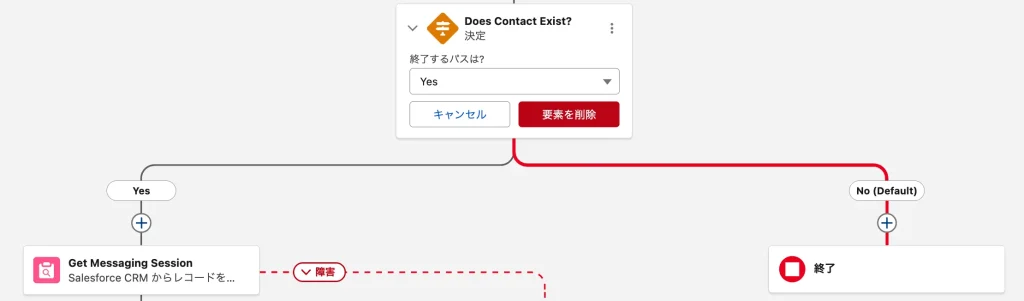
CreateCaseRecord
CreateCaseRecord要素の「ケースの項目値を設定」に追加します。
SuppliedEmail←suppliedEmailSuppliedName←suppliedName
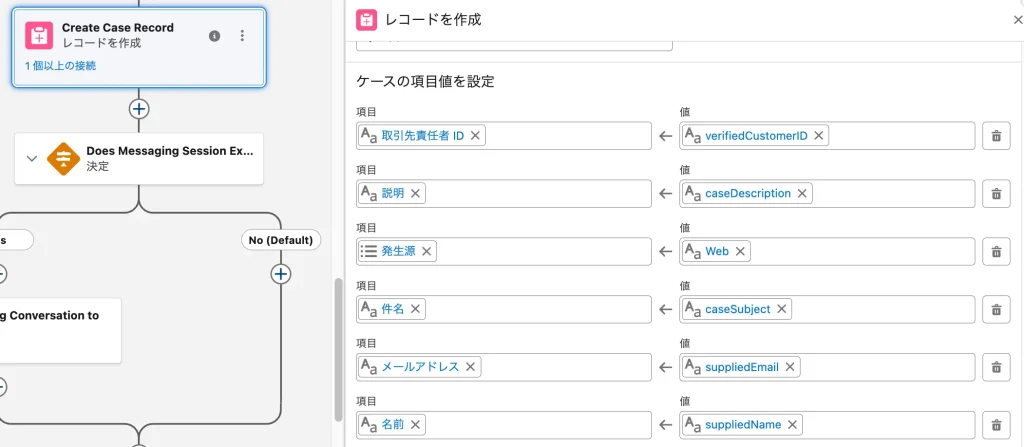
GetCase
GetCase要素の「変数に保存するケース項目を選択」に追加します。
SuppliedEmailSuppliedName
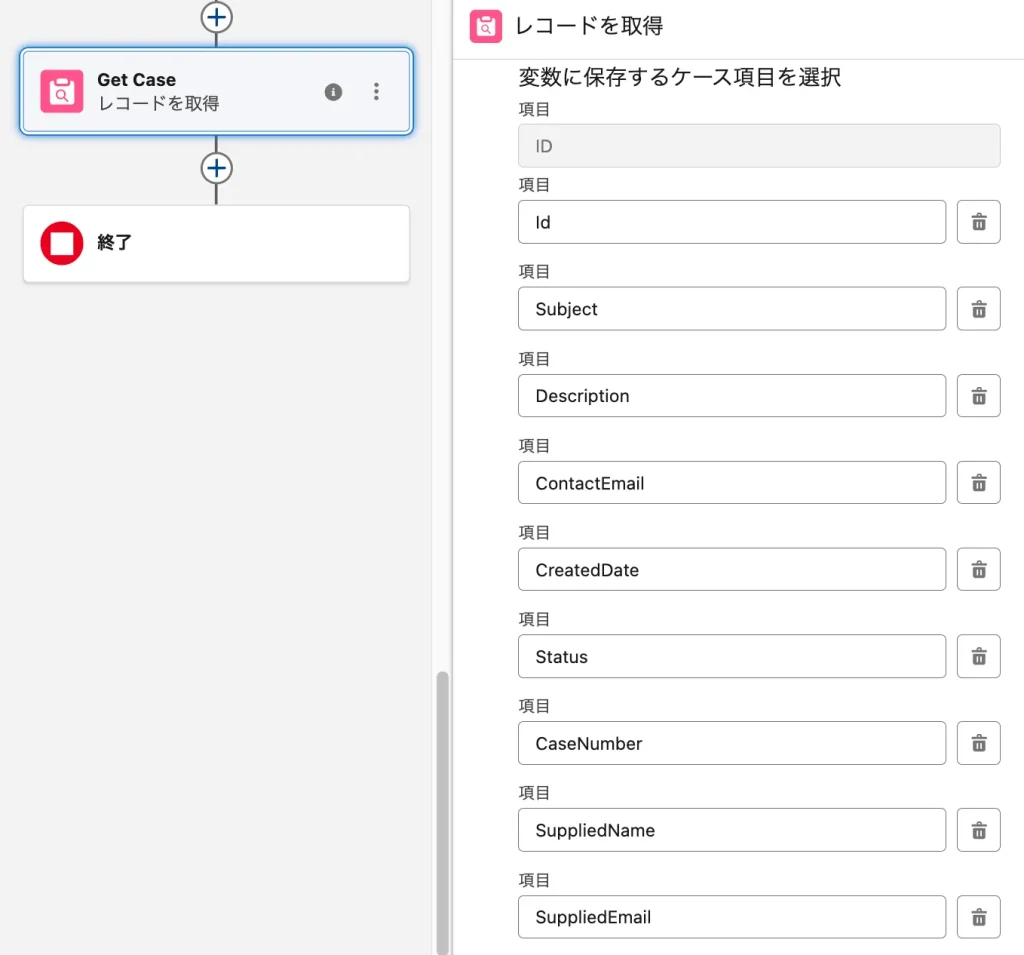
保存
歯車マーク > 詳細を表示 > 元のフロー から Create Case with Enhanced Data を削除
保存して有効化
③オムニチャネルフローの作成
エスカレーションが起動した際、そのリクエストを受け取り、適切なスキルセットとキャパシティを持つ人間のオペレーター(またはキュー)にリアルタイムでルーティングするエンジンがオムニチャネルフローです。
- 名前:
EscalateToHuman - 説明: Agentforceエージェントから人間オペレーターに引き継ぐ。
- 入力変数:
recordId(テキスト / 入力で使用可能) - キュー: Step0で作成した有人対応キューを指定

その他設定
権限を付与
エージェントに「フローを実行」の権限があるか念のため確認してください。
デフォルトで割り当たっている「Einstein_Agent_User」プロファイルにその権限が付与されているはずです。
また、権限セット「(エージェント名称)xxxxxx権限」というデフォルトで用意されている権限セットで以下の権限が存在することを確認しておきます。
- Knowledge: 参照
- ケース: 参照/作成/編集
- メッセージングセッション: 参照/編集
- メッセージングユーザー: 参照
- 取引先責任者: 参照
プレゼンス設定
[設定] > [プレゼンス設定] から、人間が応答するためのプレゼンス設定を行います。
先ほど作成したキューとオムニチャネルフローを含めるようにしてください。


Step 3: エージェントの構築
新規バージョンを作成
まずはエージェントの新規バージョンを作成します。これにより動作中のバージョンに影響を出さず安全に改善できます。
- [Agentforce スタジオ] からエージェントを選択してAgentforce Builderを開く。
- 右上の [新しいバージョン] を選択して新規バージョンを作成する。
Winter ’26までの旧UIで作成したエージェントは今回の手順に対応していません。
スクリプトを使用して指示を構築する必要があるため、旧UIで作成していた場合は、以下記事の「Agentforce Service Agent を作成」を参照してまずはベースのAgentforce Service Agentを作成してください。


スクリプトを編集
Agentforce Builderのスクリプト機能を使ってエスカレーション機能を実装していきます。
ポイントは以下のとおりです。
センチメント分析による強制ルーティングのフック
ユーザーが不満を抱くタイミングは予測できないため、顧客の入力を処理して返答を生成するメインのサブエージェント(今回は product_support と order_management)の before_reasoning にセンチメント分析のアクションを挿入します。
サブエージェントの本来のアクションを実行する前に顧客の入力を感情分析して、所定のしきい値を下回る場合はすぐさまエスカレーションに進むように設計しています。
サンプルスクリプト
    before_reasoning:
        # 回答する前に顧客の発話から感情スコア(0.0〜1.0)を取得
        run @actions.analyze_sentiment
            with input_Text_Utterance = @system_variables.user_input
            set @variables.analyzed_sentiment_score = @outputs.output_Number_SentimentScore

    reasoning:
        instructions: ->
            if @variables.analyzed_sentiment_score < 0.3:
                # 0.3未満ならエスカレーション
                set @variables.user_intent = "escalation"
                | お客様に不便をおかけしたことを謝罪します。
                  実際には実施していないことをあたかも行われたかのようにお客様に伝えることはできません。
                  例えば「○○へエスカレーションいたします。」という言葉は実際のエスカレーション行動を行っていないのにもかかわらず伝えることは禁止です。
            else:
                # 0.3以上ならナレッジ回答
                run @actions.generate_knowledge_answer
                    with "Input:Customer_Question" = @system_variables.user_input
                    | 検索結果にない情報は回答に含めないでください。
                      トーン: 専門的かつ分かりやすい言葉遣いで回答してください。
                      不明な場合: 関連する情報が見つからない場合は、正直に「情報が見つかりませんでした」と答えてください。

    after_reasoning: ->
        if @variables.user_intent == "escalation":
            transition to @subagent.custom_escalation
有人転送前に営業時間とオペレーター状況をチェックする前処理
ユーザーからの要望に応じて無条件に転送処理を走らせてしまうと、営業時間外であったり、すべてのオペレーターが対応中で長時間待機が発生したりする場合に、ユーザーに不満を与えてしまうリスクがあります。
エスカレーションの実行直前に「現在の時間帯が営業時間内か」「今すぐ対応可能なオペレーターがいるか」をシステム的に判定し、状況に応じた適切なアナウンスを出し分ける「前処理」を行う場合は、以下の記事を参考に実装をしてください。

カスタムエスカレーションサブエージェントでケース作成+オペレーター転送
遷移先の custom_escalation では、必ずケースレコード作成をしてからオペレーターに転送するように構成しています。まずケースを作成し、その直後に判定を設けてオペレーター転送を実行しています。
この構造について、詳しくは以下の記事に記載しています。よろしければご覧ください。

サンプルスクリプト
        instructions: ->
            # エスカレーション対象の会話かつ未認証ユーザーの場合は氏名とメールアドレスをヒアリング
            if @variables.user_intent == "escalation" and @variables.ContactId:
                | Call {!@actions.display_input_form} with the form data. Do NOT ask for confirmation or output any text.

            # エスカレーション対象の会話である場合かつContactIdかsuppliedEmailのどちらかが得られた場合はケース作成
            if @variables.user_intent == "escalation" and (@variables.ContactId or @variables.supplied_email):
                # 決定論的ロジック:ケースの強制作成
                run @actions.custom_create_case
                    with caseSubject = "【自動作成】オペレーターエスカレーション"
                    with caseDescription = "ユーザーよりオペレーターへの引き継ぎ要望がありました。"
                    with verifiedCustomerID = @variables.ContactId
                    with messagingSessionID = @variables.RoutableId
                    with suppliedName = @variables.supplied_name
                    with suppliedEmail = @variables.supplied_email
                    # アクションの出力結果を変数にセット
                    set @variables.case_record_id = @outputs.caseRecord.id
                    set @variables.is_create_case_processed = True
                    set @variables.has_checked_routing_availability = False

            # ケース作成が成功(IDが存在)する場合にのみ即座にエスカレーションへ遷移
            if @variables.user_intent == "escalation" and (@variables.case_record_id != "" or @variables.case_record_id is not None) and @variables.is_create_case_processed == True:
                | 即座に {!@actions.escalate_to_human} を実行し、これまでのやり取りを引き継いで担当者に繋ぎます。

            # ケース作成が失敗している場合は転送処理の不具合を知らせる
            if @variables.user_intent == "escalation" and (@variables.case_record_id == "" or @variables.case_record_id is None) and @variables.is_create_case_processed == True:
                | 転送処理に不具合があったことと時間をおいて再度試すようにお客様に伝えてください。
この実装例では、コールセンターの業務効率化のために、転送前に必ずSalesforceシステム上に「ケース(Case)」レコードを作成させ、それまでの文脈をオペレーターに引き継ぐことを必須としています。
これにより以下のようなメリットが考えられます。
- コンテキストの構造化と要約
AIエージェントが顧客と会話した内容を単なるチャット履歴として渡すのではなく、AIに「構造化された要約(件名や詳細な説明)」を作成させてケースに保存することで、人間のオペレーターは状況を瞬時に把握できるようになります。これにより、顧客に同じ質問を繰り返す手間やフラストレーションを省くことができます。 - チャット切断時の確実なフォローアップ
メッセージングセッションは、顧客がブラウザを閉じたりネットワークが切断されたりすると終了してしまいます。しかし、事前にケースが作成されていれば、チャットが不意に切断されても「未解決の課題」としてシステム上に残り続けるため、オペレーターは後からメールや電話で確実にフォローアップを行うことができます。 - 高度なSLA管理とルーティングの適用
ケースを使用することで、Salesforce標準の強力なケース割り当てルール、エスカレーション(時間経過による自動警告)ルール、およびマイルストーンを適用し、より高度な条件で適切な担当者へ案件をルーティングすることが可能になります。 - 複数チャネルの履歴の統合(オムニチャネル対応)
顧客が今日はチャットで問い合わせ、明日はメールで追加情報を送り、明後日に電話をかけてきた場合でも、それらすべての異なる通信履歴を「1つのケース」に紐付けて一元管理することができます。
なお、Experience Cloudサイトのログイン済みユーザー向けにケース作成をするためにはチャット時点でメッセージングユーザーと取引先責任者を紐付けておく必要があります。具体的な方法は以下の記事をご覧ください。

エスカレーションフローを指定する
Escalation が正常に起動したときに呼び出すオムニチャネルフローを指定します。
- 左側メニュー接続の横にある [+] > [接続を追加] を押す。
- 拡張チャット v2 を [選択済み] にして [エージェントに追加]。
- 接続を追加
- 拡張チャット v2
- エスカレーションフローを指定


最後にエージェントのバージョンを確定してActivateします。
プレビューではメッセージングセッションIDが取得できない関係でうまくいかないため、有効化してから実際のExperience Cloud画面で動作を確認してみましょう。
最終的なスクリプトは以下のようになります。ご参考になさってください。
system:
instructions: |
私たち DXforce.site 社は、Salesforce Experience Cloud の技術コンサルティングに加え、公式トレーニング教材、専門書籍、およびオリジナルグッズのオンライン販売を行う企業です。 私たちはオンラインストアを通じて顧客からの注文を受け付け、受注から配送までのフルフィルメント業務を行っています。顧客はポータルサイトを通じて、商品の購入や配送状況の確認を行うことができます。あなたは DXforce.site 社の親切で知識豊富なカスタマーサポートエージェントです。
messages:
welcome: ""
error: "申し訳ございません。問題が発生しているようです。恐れ入りますが時間をおいてもう一度お試しください。"
config:
agent_label: "Agentforce Service Agent v2"
developer_name: "Agentforce_Service_Agent_v2"
description: |
- 自律型AIエージェントとして、顧客からの注文状況の照会に対応し、ナレッジベースを活用して製品やサービスに関する質問に回答します。
- あなたの目的は、顧客の「注文状況」を確認して配送予定などを伝えること、および「製品や技術」に関する質問にナレッジベースを使って回答することです。
- 状況によって人間のオペレーターに転送することができます。
- 【行動指針】 常に丁寧な「です・ます」調で、共感を持って接してください。
- ナレッジベースやCRMデータにない情報は、推測で答えず、正直に「情報が見つかりませんでした」と伝えてください。
- 顧客の課題解決を最優先し、簡潔かつ的確な回答を心がけてください。
- 実際には取り組まないことをあたかも実施するかのようにお客様に伝えることは厳禁です。例えば「○○へエスカレーションいたします。」「このまま担当スタッフに状況を引き継ぎます。」「至急、担当部署へ状況の確認と対応を依頼いたします。」という言葉は実際のエスカレーション行動を行っていないのにもかかわらず伝えることはできません。
access:
default_agent_user: "agentforce_service_agent@00dgk00000ft5ol1725598226.ext"
language:
default_locale: "ja"
additional_locales: ""
all_additional_locales: False
variables:
RoutableId: linked string
source: @MessagingSession.Id
description: "This variable may also be referred to as MessagingSession Id"
ContactId: linked string
source: @MessagingEndUser.ContactId
description: "This variable may also be referred to as MessagingEndUser ContactId"
case_record_id: mutable string = ""
description: "The Case Record ID that generated by Flow"
user_intent: mutable string = ""
description: "User intent"
analyzed_sentiment_score: mutable number = 0.5
description: "Sentiment score analyzed from user utterances"
is_create_case_processed: mutable boolean = False
description: "True if the case creation process has been completed"
is_within_business_hours: mutable boolean = False
description: "Indicates whether the current or specified date and time falls within the defined business hours (True) or not (False)."
next_start_time: mutable string = ""
description: "The date and time when the next business hours period is scheduled to start. This is typically used to inform users when support will resume when the current time is outside of business hours."
is_immediately_available: mutable boolean = False
description: "Indicates whether operators are capable of handling the request immediately (True) or not (False)."
estimated_wait_time: mutable number = 0
description: "The estimated wait time in seconds before a new work item is assigned to an available operator, calculated based on real-time omni-channel routing metrics."
has_checked_routing_availability: mutable boolean = False
description: "Indicates whether the agent has already verified the real-time routing and omni-channel agent availability status (True) or not (False)."
next_subagent: mutable string = ""
description: "The identifier of the specific sub-agent to which the conversation should be routed next, determined based on the user's intent or routing rules."
supplied_name: mutable string = ""
description: "The name of the user or customer provided via an input form."
supplied_email: mutable string = ""
description: "The email address provided by the user via an input form."
start_agent agent_router:
label: "Agent Router"
description: "Welcome the user and determine the appropriate subagent based on user input"
reasoning:
instructions: |
You are an agent router for this assistant.
Welcome the guest and analyze their input to determine the most appropriate subagent to handle their request.
actions:
go_to_general_conversation: @utils.transition to @subagent.general_conversation
description: "General conversations other than order inquiries and knowledge-base queries are handled here."
go_to_product_support: @utils.transition to @subagent.product_support
description: "Support users in resolving specific issues or questions about products."
go_to_order_management: @utils.transition to @subagent.order_management
description: "Verifying the status and providing detailed information about the user's order."
go_to_custom_escalation: @utils.transition to @subagent.custom_escalation
description: "Creates a case record to hand over information and transfers the interaction to a human agent."
available when @variables.user_intent == "escalation"
subagent general_conversation:
label: "General Conversation"
description: "General conversations other than order inquiries and knowledge-base queries are handled here."
reasoning:
instructions: ->
| どのような要件か聞き出してください。
run @actions.analyze_sentiment
with input_Text_Utterance = @system_variables.user_input
set @variables.analyzed_sentiment_score = @outputs.output_Number_SentimentScore
if @variables.analyzed_sentiment_score < 0.3:
set @variables.user_intent = "escalation"
| お客様に不便をおかけしたことを謝罪します。
実際には取り組まないことをあたかも実施するかのようにお客様に伝えることは厳禁です。
例えば「○○へエスカレーションいたします。」「このまま担当スタッフに状況を引き継ぎます。」「至急、担当部署へ状況の確認と対応を依頼いたします。」という言葉は実際のエスカレーション行動を行っていないのにもかかわらず伝えることはできません。
after_reasoning:
if @variables.analyzed_sentiment_score < 0.3:
transition to @subagent.custom_escalation
actions:
analyze_sentiment:
description: "顧客の発話の感情分析を行います。"
inputs:
input_Text_Utterance: string
description: "顧客による発言"
is_required: True
outputs:
output_Number_SentimentScore: number
description: "顧客の最新の発話の感情スコア(0.0〜1.0)"
target: "flow://AnalyzeCustomerSentiment"
label: "Analyze Sentiment"
subagent product_support:
label: "Product Support"
description: "Provides accurate information using the knowledge base in response to questions regarding product specifications, features, usage, troubleshooting, or return policies. This topic aims to support users in resolving specific issues or questions about products."
before_reasoning:
# 回答する前に顧客の発話から感情スコア(0.0〜1.0)を取得
run @actions.analyze_sentiment
with input_Text_Utterance = @system_variables.user_input
set @variables.analyzed_sentiment_score = @outputs.output_Number_SentimentScore
reasoning:
instructions: ->
if @variables.analyzed_sentiment_score < 0.3:
# 0.3未満ならエスカレーション
set @variables.user_intent = "escalation"
| お客様に不便をおかけしたことを謝罪します。
実際には実施していないことをあたかも行われたかのようにお客様に伝えることはできません。
例えば「○○へエスカレーションいたします。」という言葉は実際のエスカレーション行動を行っていないのにもかかわらず伝えることは禁止です。
else:
# 0.3以上ならナレッジ回答
run @actions.generate_knowledge_answer
with "Input:Customer_Question" = @system_variables.user_input
| 検索結果にない情報は回答に含めないでください。
トーン: 専門的かつ分かりやすい言葉遣いで回答してください。
不明な場合: 関連する情報が見つからない場合は、正直に「情報が見つかりませんでした」と答えてください。
after_reasoning: ->
if @variables.user_intent == "escalation":
transition to @subagent.custom_escalation
actions:
analyze_sentiment:
description: "顧客の発話の感情分析を行います。"
inputs:
input_Text_Utterance: string
description: "顧客による発言"
is_required: True
outputs:
output_Number_SentimentScore: number
description: "顧客の最新の発話の感情スコア(0.0〜1.0)"
target: "flow://AnalyzeCustomerSentiment"
label: "Analyze Sentiment"
generate_knowledge_answer:
description: "ナレッジ記事に基づいて、ユーザーの質問に対する回答を生成します。"
inputs:
"Input:Customer_Question": string
description: "お客様が入力した質問をセットします。"
label: "Customer Question"
is_required: True
is_user_input: True
complex_data_type_name: "lightning__textType"
citationMode: string
description: "Select Citation Mode"
label: "Citation Mode"
is_required: False
is_user_input: False
complex_data_type_name: "lightning__textType"
outputs:
promptResponse: string
description: "The prompt response generated by the action based on the specified prompt and input."
label: "Prompt Response"
complex_data_type_name: "lightning__textType"
filter_from_agent: False
is_displayable: False
citations: object
description: "The prompt citation response generated by the action based on the specified prompt and input."
label: "Citations"
complex_data_type_name: "@apexClassType/AiCopilot__GenAiCitationOutput"
filter_from_agent: False
is_displayable: False
target: "generatePromptResponse://generate_knowledge_answer"
require_user_confirmation: False
include_in_progress_indicator: True
progress_indicator_message: "ご質問への回答を生成中..."
label: "Generate Knowledge Answer"
subagent order_management:
label: "Order Management"
description: "Handles inquiries regarding order shipping status, order status, estimated delivery dates, or order details, and retrieves and provides the latest information from the system based on the order number. This topic specializes in verifying the status and providing detailed information about the user's order."
before_reasoning:
# 回答する前に顧客の発話から感情スコア(0.0〜1.0)を取得
run @actions.analyze_sentiment
with input_Text_Utterance = @system_variables.user_input
set @variables.analyzed_sentiment_score = @outputs.output_Number_SentimentScore
reasoning:
actions:
retrieve_order_data: @actions.retrieve_order_data
with input_Text_OrderNumber = ...
instructions: ->
if @variables.analyzed_sentiment_score < 0.3:
# 0.3未満ならエスカレーション
set @variables.user_intent = "escalation"
| お客様に不便をおかけしたことを謝罪します。
実際には実施していないことをあたかも行われたかのようにお客様に伝えることはできません。
例えば「○○へエスカレーションいたします。」という言葉は実際のエスカレーション行動を行っていないのにもかかわらず伝えることは禁止です。
else:
# 0.3以上なら注文状況取得
| まずユーザーに「注文番号を教えていただけますか?」と尋ねてください。
注文番号が得られたら、速やかに {!@actions.retrieve_order_data} アクションを実行します。
実行結果(ステータスや配送日)をユーザーに丁寧に伝えてください。
after_reasoning: ->
if @variables.user_intent == "escalation":
transition to @subagent.custom_escalation
actions:
analyze_sentiment:
description: "顧客の発話の感情分析を行います。"
inputs:
input_Text_Utterance: string
description: "顧客による発言"
is_required: True
outputs:
output_Number_SentimentScore: number
description: "顧客の最新の発話の感情スコア(0.0〜1.0)"
target: "flow://AnalyzeCustomerSentiment"
label: "Analyze Sentiment"
retrieve_order_data:
description: "注文番号(input_Text_OrderNumber)を入力キーとして受け取り、Salesforce の注文(Order)オブジェクトを検索して、現在のステータス、配送予定日、および配送追跡情報を返します。 ユーザーが「私の注文はどうなっていますか?」「荷物はいつ届きますか?」「発送は終わりましたか?」といった、特定の注文の進捗状況や詳細を知りたがっている場合に、このアクションを使用してください。"
inputs:
input_Text_OrderNumber: string
description: "顧客から得た注文番号。"
label: "input_Text_OrderNumber"
is_required: True
is_user_input: True
complex_data_type_name: "lightning__textType"
outputs:
output_Text_StatusMessage: string
description: "注文の進捗状況や詳細。"
label: "output_Text_StatusMessage"
complex_data_type_name: "lightning__textType"
filter_from_agent: False
is_displayable: False
target: "flow://RetrieveOrderData"
require_user_confirmation: False
include_in_progress_indicator: True
progress_indicator_message: "ご注文状況を確認中..."
label: "Retrieve Order Data"
subagent routing_availability_check:
label: "Routing Availability Check"
description: "A sub-agent for preliminary checks that determines business hours and agent availability prior to escalation."
reasoning:
instructions: ->
# 1. LLMの推論が始まる前に、必ずシステム側で営業時間を判定する
run @actions.check_business_hours
set @variables.is_within_business_hours = @outputs.isWithinBusinessHours
set @variables.next_start_time = @outputs.nextStartDatetimeFormatted
# 2. 営業時間内の場合のみ、さらにオペレーターの待機状況を取得する
if @variables.is_within_business_hours == True:
run @actions.check_routing_availability
set @variables.is_immediately_available = @outputs.output_Boolean_IsImmediatelyAvailable
set @variables.estimated_wait_time = @outputs.output_Number_EstimatedWaitTime
# 3. 取得した状態(変数)に基づいて、プロンプトと実行パスを出し分ける
if @variables.is_within_business_hours == False and (@variables.next_start_time != "" or @variables.next_start_time is not None):
| {!@variables.next_start_time}を使用して、「申し訳ございません。現在、オペレーターによる対応は営業時間外です。次回の対応は◯月◯日◯時◯分からでございます」のように、お客様に自然で丁寧な表現で案内してください。
if @variables.is_within_business_hours == False and (@variables.next_start_time == "" or @variables.next_start_time is None):
| オペレーター状況の取得に失敗し、転送ができない状況であることを丁寧な表現で謝罪してください。
# 営業時間内かつ即時転送ができない状態なら時間をおいて再度試してもらう
if @variables.is_within_business_hours == True and @variables.is_immediately_available == False:
| 現在すべてのオペレーターが対応中であり、すぐにお繋ぎできない旨を丁寧に謝罪してください。
その上で、予想待機時間が約{!@variables.estimated_wait_time}分であることをお伝えし、時間を空けて再度オペレーターへの転送依頼をメッセージいただくようご案内します。
その際、ページ再読み込みや別ページへの遷移は問題ありませんが、キャッシュ・クッキーの削除や別端末・別ブラウザでのアクセスなど会話がリセットされる行動はしないように、丁寧に伝えてください。
actions:
check_routing_availability: @actions.check_routing_availability
with input_Text_DummyInput = ...
after_reasoning:
# 営業時間内かつ即時転送可能な状態ならエスカレーションに進む
if @variables.is_within_business_hours == True and @variables.is_immediately_available == True and @variables.next_subagent == "custom_escalation":
set @variables.has_checked_routing_availability = True
transition to @subagent.custom_escalation
actions:
check_business_hours:
description: "営業時間内かどうかと次回開始日時を取得する"
inputs:
businessHoursIdOrName: string
label: "営業時間IDまたは名称"
description: "判定に使用する営業時間(BusinessHours)のIDまたは名前を指定します。指定がない場合は組織のデフォルト営業時間が使用されます。"
is_required: False
is_user_input: False
filter_from_agent: False
is_displayable: False
targetDatetime: datetime
label: "判定対象日時"
description: "判定対象の日時を指定します。空の場合は現在の日時が適用されます。"
is_required: False
is_user_input: False
filter_from_agent: False
is_displayable: False
outputs:
isWithinBusinessHours: boolean
label: "対応時間内フラグ"
description: "指定された日時がオペレーターの対応時間内である場合はTrue、時間外の場合はFalseを返します。"
developer_name: "isWithinBusinessHours"
is_displayable: False
filter_from_agent: False
nextStartDatetimeFormatted: string
label: "次回営業開始日時(フォーマット済み文字列)"
description: "設定された営業時間のタイムゾーンに合わせてフォーマットされた次回営業開始日時(yyyy/MM/dd HH:mm)です。"
developer_name: "nextStartDatetimeFormatted"
is_displayable: False
filter_from_agent: False
target: "apex://BusinessHoursAvailabilityAction"
label: "Check Business Hours"
check_routing_availability:
label: "Check Routing Availability"
description: "オムニチャネルルーティングの対応可能オペレーター数と予想待機時間を取得する"
target: "flow://Check_Availability_for_Routing"
outputs:
output_Boolean_IsImmediatelyAvailable: boolean
label: "output_Boolean_IsImmediatelyAvailable"
description: "今すぐルーティング可能なオペレーターがいるかどうかを示すフラグ"
complex_data_type_name: "lightning__booleanType"
developer_name: "output_Boolean_IsImmediatelyAvailable"
is_displayable: False
filter_from_agent: False
output_Number_EstimatedWaitTime: number
label: "output_Number_EstimatedWaitTime"
description: "想定される待ち時間"
complex_data_type_name: "lightning__numberType"
developer_name: "output_Number_EstimatedWaitTime"
is_displayable: False
filter_from_agent: False
inputs:
input_Text_DummyInput: string
label: "input_Text_DummyInput"
description: "入力不要です"
is_required: False
complex_data_type_name: "lightning__textType"
is_user_input: False
filter_from_agent: False
is_displayable: False
subagent custom_escalation:
label: "Custom Escalation"
description: "Creates a case record to hand over information and transfers the interaction to a human agent."
reasoning:
actions:
display_input_form: @actions.display_input_form
with contact_form_data = ...
set @variables.supplied_name = @outputs.contact_form_result_data.suppliedName
set @variables.supplied_email = @outputs.contact_form_result_data.suppliedEmail
escalate_to_human: @utils.escalate
description: "Escalate the conversation to a live human agent."
available when (@variables.case_record_id != "" or @variables.case_record_id is not None)
instructions: ->
# ルーティング可否チェック済みフラグがFalseならチェックから実行
if @variables.has_checked_routing_availability == False:
set @variables.next_subagent = "custom_escalation"
transition to @subagent.routing_availability_check
# エスカレーション対象の会話かつ未認証ユーザーの場合は氏名とメールアドレスをヒアリング
if @variables.user_intent == "escalation" and @variables.ContactId:
| Call {!@actions.display_input_form} with the form data. Do NOT ask for confirmation or output any text.
# エスカレーション対象の会話である場合かつContactIdかsuppliedEmailのどちらかが得られた場合はケース作成
if @variables.user_intent == "escalation" and (@variables.ContactId or @variables.supplied_email):
# 決定論的ロジック:ケースの強制作成
run @actions.custom_create_case
with caseSubject = "【自動作成】オペレーターエスカレーション"
with caseDescription = "ユーザーよりオペレーターへの引き継ぎ要望がありました。"
with verifiedCustomerID = @variables.ContactId
with messagingSessionID = @variables.RoutableId
with suppliedName = @variables.supplied_name
with suppliedEmail = @variables.supplied_email
# アクションの出力結果を変数にセット
set @variables.case_record_id = @outputs.caseRecord.id
set @variables.is_create_case_processed = True
set @variables.has_checked_routing_availability = False
# ケース作成が成功(IDが存在)する場合にのみ即座にエスカレーションへ遷移
if @variables.user_intent == "escalation" and (@variables.case_record_id != "" or @variables.case_record_id is not None) and @variables.is_create_case_processed == True:
| 即座に {!@actions.escalate_to_human} を実行し、これまでのやり取りを引き継いで担当者に繋ぎます。
# ケース作成が失敗している場合は転送処理の不具合を知らせる
if @variables.user_intent == "escalation" and (@variables.case_record_id == "" or @variables.case_record_id is None) and @variables.is_create_case_processed == True:
| 転送処理に不具合があったことと時間をおいて再度試すようにお客様に伝えてください。
actions:
display_input_form:
target: "apex://ContactFormService"
description: "未認証ユーザーの氏名とメールアドレスを入力するフォーム"
inputs:
contact_form_data: object
description: "氏名とメールアドレス"
label: "contact_form_data"
is_required: True
is_user_input: True
complex_data_type_name: "c__contactFormInput"
outputs:
contact_form_result_data: object
description: "入力したデータのパススルー"
label: "contact_form_result_data"
complex_data_type_name: "c__contactFormOutput"
filter_from_agent: False
is_displayable: False
label: "Display Input Form"
custom_create_case:
description: "ケースを作成します。"
inputs:
caseSubject: string
description: "Stores the subject of the case to create."
label: "caseSubject"
complex_data_type_name: "lightning__textType"
is_required: True
is_user_input: False
filter_from_agent: False
is_displayable: False
caseDescription: string
description: "Stores the details of the user issue to be used for the case."
label: "caseDescription"
complex_data_type_name: "lightning__textType"
is_required: True
is_user_input: False
filter_from_agent: False
is_displayable: False
verifiedCustomerID: string
description: "Stores the verified Customer ID to use when creating the case record."
label: "verifiedCustomerID"
complex_data_type_name: "lightning__textType"
is_required: False
is_user_input: False
filter_from_agent: False
is_displayable: False
messagingSessionID: string
description: "Stores the Messaging Session ID from the messaging conversation between a bot or AI Agent and a customer."
label: "messagingSessionID"
complex_data_type_name: "lightning__textType"
is_required: True
is_user_input: False
filter_from_agent: False
is_displayable: False
suppliedEmail: string
label: "suppliedEmail"
description: "The email that user input."
is_required: False
complex_data_type_name: "lightning__textType"
is_user_input: False
filter_from_agent: False
is_displayable: False
suppliedName: string
label: "suppliedName"
description: "The user name that user input."
is_required: False
complex_data_type_name: "lightning__textType"
is_user_input: False
filter_from_agent: False
is_displayable: False
outputs:
caseRecord: object
description: "The Case record created by the flow."
complex_data_type_name: "lightning__recordInfoType"
label: "caseRecord"
developer_name: "caseRecord"
is_displayable: False
filter_from_agent: False
target: "flow://CUSTOM_Create_Case_with_Enhanced_Data"
label: "Custom Create Case"
connection customer_web_client:
adaptive_response_allowed: True
outbound_route_name: "flow://EscalateToHuman"
outbound_route_type: "OmniChannelFlow"
escalation_message: "お待たせいたしました。有人転送を開始いたします。"
canEscalateをtrueに更新する
Agentforceにおいて、エージェントが実行可能な特定の業務カテゴリや機能スコープを定義する「サブエージェント」は、内部的には GenAiPluginDefinition というメタデータオブジェクトとして保存・管理されています 。
新たに作成されたカスタムサブエージェントは、デフォルトの状態では人間のオペレーターへ会話を転送する権限を有していません。このエスカレーションの適格性は、GenAiPluginDefinitionオブジェクト内のcanEscalateというブール値(boolean)フィールドによって厳密に制御されています。このフィールドがfalseのままである限り、指示内でどれほど詳細に「オペレーターに転送してください」と指示を与えたとしても、Atlas Reasoning Engineはシステムレベルでのルーティングプロセスをトリガーすることができない仕組みになっています。
開発者コンソールを使用して、以下のSOQLで canEscalate を true に更新しましょう。
SELECT Id, Planner.DeveloperName, canEscalate FROM GenAiPluginDefinition WHERE DeveloperName LIKE 'custom_escalation%' ORDER BY Planner.DeveloperName
まとめ:エージェントの動作確認をする
それでは最後にExperience Cloudサイトにログインしてオペレータに転送されるか確認してみましょう。
はじめは普通に会話して、途中からわざと怒って人間にエスカレーションしてくれるか反応を見ます。
製品サポートの問いかけをしてみる
ナレッジに登録しておいたデータに基づいて、うまく回答を返してくれました。
さらに、オペレーターへの転送もうまくいっています。


注文状況の確認をしてみる
ちゃんと注文番号を聞き出してからステータスを調べて返答していますね。
こちらもオペレーター転送が成功しています。


オペレーターが見ている画面
Agentforce Service Agentからメッセージング転送を受けたオペレーターは、エージェントが事前に作成したケースの要約やこれまでの会話内容を見ながらチャット対応を行うことができます。

無事にAgent Scriptを活用しながらAgentforceエージェントからオペレーターへの転送が成功しました。
感情分析とケース登録とエスカレーションを組み合わせる、実態に合わせた難易度の高い実装でしたがうまくいきましたね。皆さんはここからさらに発展させて完璧なエスカレーション構築をしてみてください。
参考URL
Transfer Conversations from an Agent with an Omni-Channel Flow

utils.escalate

Get Started with Agent Script

Code Your Agent Using Its Agent Script File

Agentforce Builder に関する考慮事項
Agent Script Recipes




読者の声